
Prepo.ai
AI Practice & Mock Tests for Any Subject
Prepo.ai dynamically generates custom AI practice tests and mock assessments tailored to any academic level, subject, or chapter. Upload notes or choose topics for instant 0ms scoring, 4-part AI explanations, and teacher shareable test links with live response leaderboards.
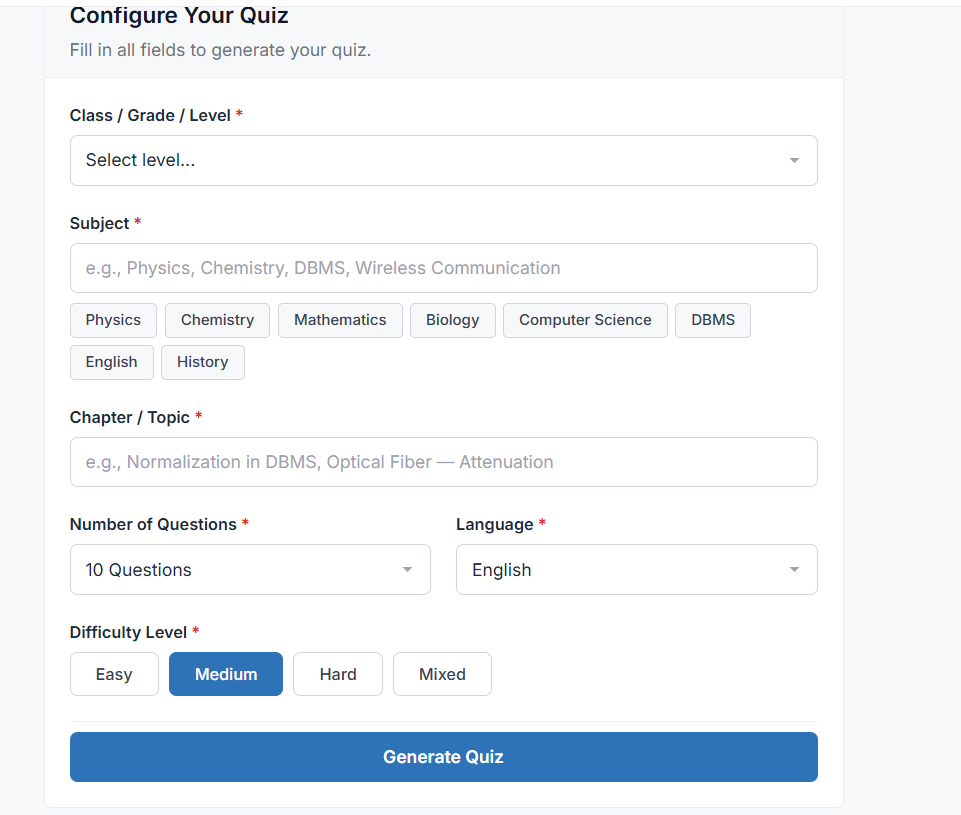
Experience Prepo.ai in Action
AI-generated practice tests and mock assessments for students preparing for exams and teachers managing tests.
1. AI Practice & Mock Test Generator
Select Class Level, Subject, Chapter/Topic, or Upload Study Notes (PDF/Doc) with custom Difficulty & Language.
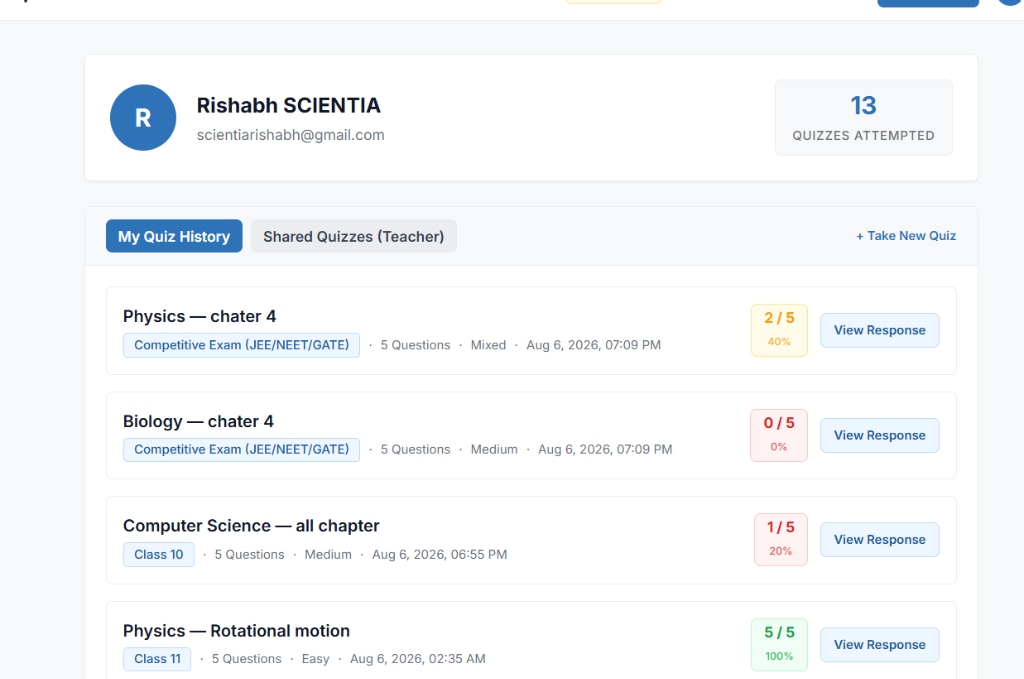
2. User Attempt History & Score Badges
Personal dashboard displaying mock tests attempted, score percentages, and 1-click response review.
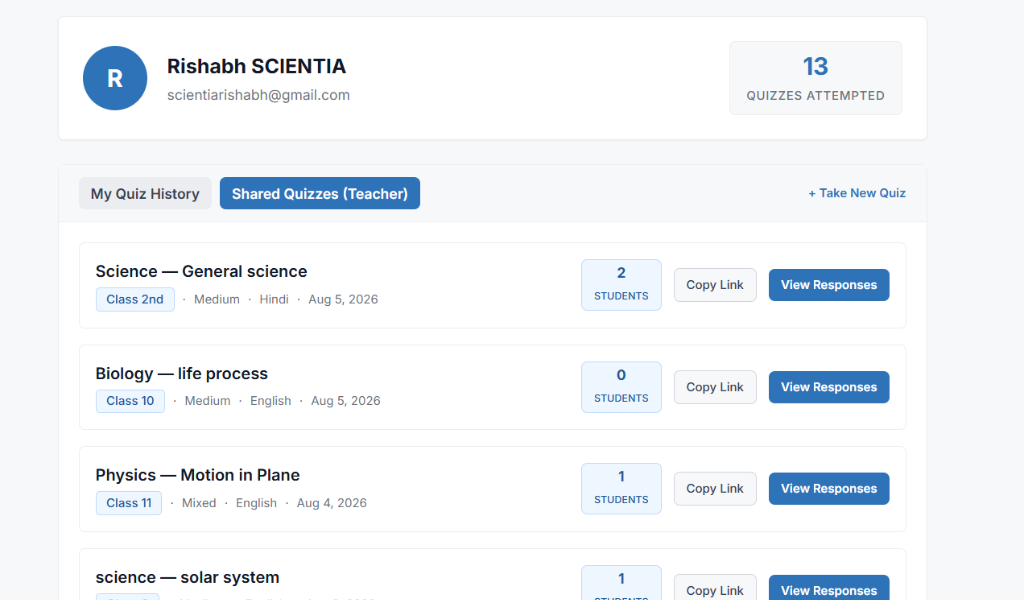
3. Teacher Shared Tests & Student Submissions
Track student responses, copy 1-click test links, and view live student submissions.
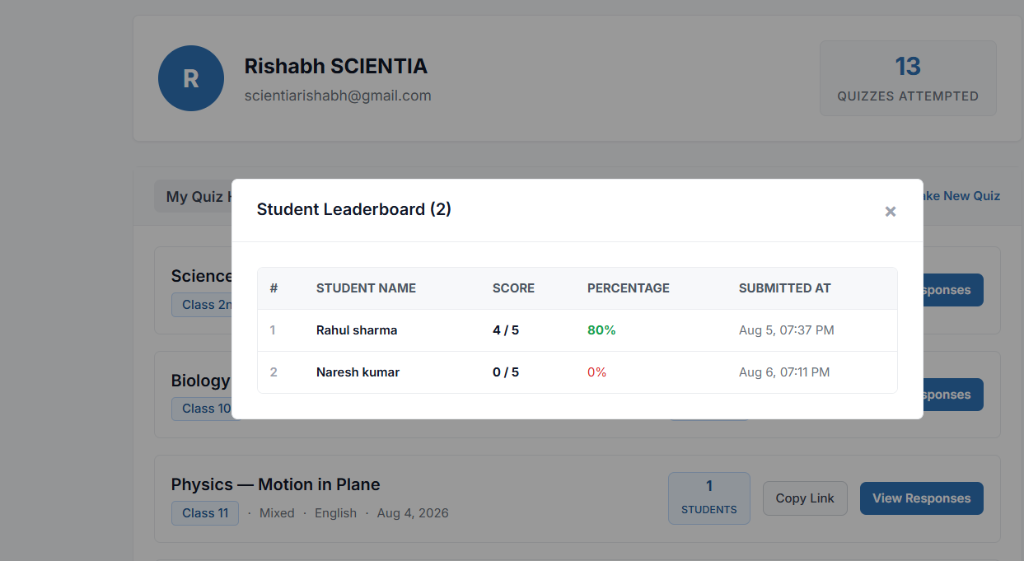
4. Real-Time Student Leaderboard
Live ranking table showing student names, scores, percentages, and submission timestamps.
Key Features
Everything you need for smart AI mock test generation and instant grading.
🎯 Custom AI Mock & Practice Tests
Create tests by topic or upload study notes (PDF/Doc). Select Grade/Class (Class 1–12, NEET, JEE, B.Tech ECE, etc.), Subject (Physics, Chemistry, DBMS, Math), Chapter/Topic, Question Count (5-20), Difficulty (Easy/Medium/Hard/Mixed), and Language (English, Hindi, Hinglish).
⚡ Instant 0ms Scoring & AI Explanations
Deterministic 0ms grading. Each question includes a 4-part AI explanation: Verdict, Core Concept, Step-by-Step Reasoning, and Misconception Analysis explaining why wrong options are incorrect.
📊 Attempt History & Score Badges
Personal dashboard tracking mock tests attempted with color-coded score badges (Green 100%, Blue 80%, Yellow 40%, Red 0%) and 1-click full response review for past attempts.
🔗 Teacher Share & Student Mode
Teachers can share any practice test via a 1-click link (?quiz_id=UUID). Pre-stored explanations allow 50+ students to submit concurrently with instant 0.1s grading and no signup needed for students.
🏆 Live Teacher Leaderboard
Teachers can view real-time student submission counts, scores, percentage ranks, and timestamps in a clean leaderboard view.
🔑 Free Credits & Secure Auth
Secure login with Google or Supabase Auth. Every user gets 3 free credits upon signup to generate custom AI practice tests immediately.
How to Use Prepo.ai
Step-by-step guide to generating practice tests, taking mock assessments, and reviewing student leaderboards.
Visit Platform & Sign In
Go to https://www.prepo.co.in/ (or search "AI Practice Tests by Prepo"). Sign in using Google or email with Supabase Auth to claim your 3 Free Test Generation Credits.
Configure & Generate Your Practice Test
Click "Start Practice Test" and choose your topic or upload study notes (PDF/Doc):
- Class / Grade Level: e.g., Class 10 CBSE, Class 12, B.Tech 3rd Sem ECE, JEE / NEET Dropper.
- Subject: Physics, Chemistry, Math, Biology, Computer Science, DBMS, etc.
- Chapter / Topic or Notes: e.g., Normalization in DBMS, Optical Fiber Attenuation, or upload your lecture notes.
- Options: Select question count (5–20), difficulty (Easy/Medium/Hard/Mixed), and language (English, Hindi, Hinglish).
Attempt Test & Get Instant AI Explanations
Submit your answers to receive instant 0ms grading. Review comprehensive 4-part AI explanations (Verdict, Core Concept, Step-by-Step Reasoning, and Misconception Analysis) for every single question.
Track History & Share With Students (Teacher Mode)
Access "My Test History" anytime to review past performance badges. Teachers can switch to "Shared Tests (Teacher)", click "Copy Link" to distribute to students without requiring student signups, and open the Live Leaderboard to view student submissions in real time.
Ready to Experience Prepo.ai?
Start generating custom AI practice tests & mock assessments in seconds with 3 free credits. No installation required.